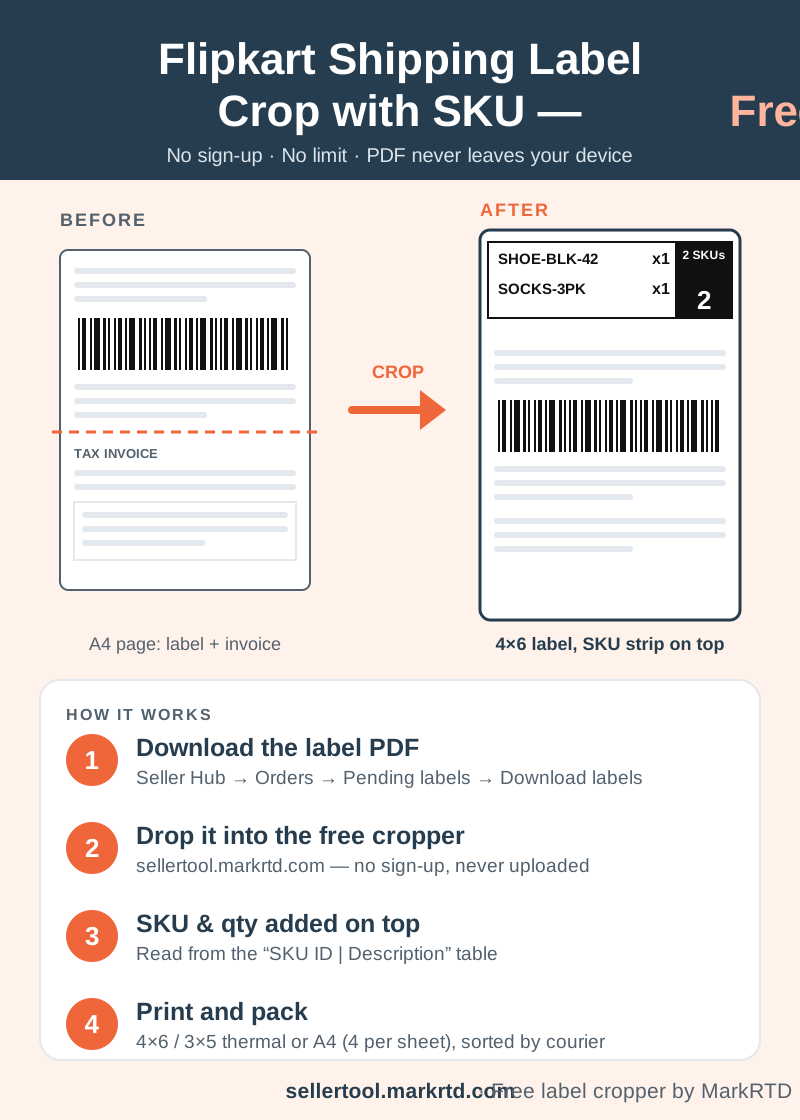
Crop Flipkart Seller Hub labels to 4×6, 3×5 or A4 for free, with the SKU and qty of each order printed in a bold strip on top of its label.
Flipkart Shipping Label Crop with SKU, Free
Flipkart Seller Hub gives you an A4 page for every order, with the shipping label on top and the tax invoice below it. A thermal printer needs only the label, and even once it is cut out, your packer still has to look up what goes in each parcel.
This free Flipkart shipping label crop tool cuts every label out of the PDF onto its own 4×6 or 3×5 inch page, or four to an A4 sheet, and prints the SKU and quantity in a bold strip on top. The details come from the order table printed on the same Flipkart page, so nothing has to be typed.
It is free with no sign-up and no limit on files. The PDF is processed inside your browser and never uploaded, so customer names and addresses stay on your phone or computer.
How to Crop Flipkart Labels with SKU in 4 Steps
Step 1: In Flipkart Seller Hub, go to Orders → Pending labels and download the labels for the orders you are shipping today.
Step 2: Drop the PDF into the box above, or tap to pick it. Several PDFs can go in together, and Meesho or Amazon label files can join the same batch.
Step 3: Keep “SKU & qty on each label” turned on, choose 4×6/3×5 thermal or A4 with 4 labels per sheet, and pick how to sort. Press Crop labels.
Step 4: Check the preview, download the PDF and print at actual size (100%). Scan one test label with your phone before printing the batch.
How the free Flipkart shipping label crop with SKU works
Where the SKU on a Flipkart Label Comes From
Each Flipkart label page has a “SKU ID | Description” table with the quantity next to it. The cropper reads that table and prints one line per item above the label: the SKU with its quantity, such as x1 or x3.
The box on the right shows the total units and turns black when an order has more than one unit, so multi-quantity orders stand out at the packing table. An order with two or more products shows how many SKUs it has and lists each one; above four products, three are shown with a note to see the invoice for the rest.
The label, barcode and address are not redrawn. They are cut out exactly as Flipkart made them, with only the SKU strip added above.
Why Add the SKU to Flipkart Labels
A wrong item or a missing piece usually ends in a return, and a return costs you shipping both ways. Most of these mistakes happen at the packing table, when products look alike or an order needs more than one unit. With the SKU and quantity printed on the label, the packer reads exactly what goes in the box without opening Seller Hub or matching a separate order list.
It also makes the work easy to hand over. A helper or a new team member can pack from the labels alone, and the black quantity box tells them at a glance when an order needs two or more pieces.
Sort Flipkart Labels by Courier for Pickup
Flipkart labels carry readable text, so the cropper also reads the courier, the order ID and whether the order is COD or prepaid. Sort by courier so each courier’s parcels are stacked together for handover, by SKU for packing, or by courier and then SKU. The summary shows how many orders go with each courier and how many are COD.
The picklist lists every SKU with its orders and total quantity, as a PDF to print for your team or a CSV to open in Excel.
Flipkart Label with or without the Invoice
You choose what happens to the invoice part of each page: leave it out and print labels only, get a separate A4 PDF of cropped invoices, get a separate thermal PDF, or place each invoice right after its label in the same PDF. The Flipkart label crop with invoice page opens with that last option already set.
Every batch stays in this browser for 24 hours under Recent crops, so a failed print is easy to redo. It is then deleted automatically.
Printer, Paper and Barcode Tips
Load 4×6 inch thermal labels for a thermal printer, or use plain A4 sheets in any inkjet or laser printer, which fit four labels a page. Print at actual size, not Fit to page, so the barcode keeps its width and scans at pickup.
If you also sell on Meesho or Amazon, crop all your labels from the same place: each marketplace’s labels come out with their own SKU details.
Below this article you will find more tools for Flipkart sellers: a shipment report from your Flipkart orders, thank-you cards with each customer’s name, the Flipkart price calculator for your margin, and a polybag size calculator for packing.
Frequently asked questions
Is Flipkart label crop with SKU free?
Yes. Cropping, the SKU strip, sorting and the picklist are free with no sign-up and no limit on files.